

Limit Types
| Type | What it measures | Resets |
|---|---|---|
| Budget | Dollar spend | Weekly / monthly / every N days / never |
| Token | Tokens used per request | Weekly / monthly / every N days / never |
| Request count | Number of calls made | Weekly / monthly / every N days / never (policies only) |
| Rate limit | Requests or tokens per time window | Automatically — sliding window |
Level 1 — API Key
An API key represents a team, a service, or an individual. Limits set here apply to everything that key does, regardless of which workspace is involved. Supports: Budget, Token, Rate limits (per minute / hour / day / week)Use Cases
Per-team monthly budget Each team gets their own key with a monthly spend limit. Engineering, Marketing, and Research each stay within their allocation — and Finance gets clean per-team visibility without digging through logs. Contractor or temporary access with a hard cap Issue a key with a fixed lifetime budget and no reset. Once the budget runs out, access stops automatically. No manual revocation needed. Automated pipeline safety net A service account used in test pipelines gets a token rate limit. A runaway test loop won’t quietly run up costs overnight. Get notified before you hit the wall Set an alert threshold at 80% of the budget. The team gets a heads-up before access is blocked, with time to act.Level 2 — Workspace
A workspace groups the people and projects in a part of your organisation. Limits here apply to the combined activity of everyone in that workspace. Supports: Budget, Token, Rate limits (per minute / hour / day / week)Request-count budgets are not available at the workspace level — cost and token budgets only.
Use Cases
Department spend allocation Each department gets its own workspace with a monthly budget. Teams stay within their allocation, and spend rolls up cleanly without any custom reporting. Client project with a fixed budget A client project workspace gets a one-time budget with no reset. When it’s used up, the team knows the project has hit its allocated spend for the engagement. Keep staging costs in check A staging workspace gets a low rate limit so developers can’t accidentally rack up production-scale costs while testing. Token quota for a research team A research workspace gets a monthly token budget. The team lead gets alerted before the quota runs out, with time to request more before work is interrupted.Level 3 — Integration (Provider)
An integration is your connection to a specific provider. Limits set here apply across every workspace using that integration — it’s the most reliable place to enforce a hard ceiling on provider spend. You can also set per-workspace sub-limits within an integration, so each workspace has its own counter while still sharing the integration-level ceiling. Supports: Budget, Token, Rate limits (per minute / hour / day / week)Use Cases
Match your provider contract If you have a monthly commitment with a provider, set your integration budget just below that ceiling. Portkey stops requests before they reach the provider — no surprise invoices. Respect a provider’s rate cap If your deployment has a hard rate limit on the provider side, mirror it on the integration. Portkey rejects excess requests cleanly before they ever hit the provider. Cross-workspace spend cap An integration shared across 10 workspaces gets a single monthly token budget. No combination of workspace activity can push past it. Per-workspace allocations within an integration Two workspaces share the same provider but get different monthly budgets. Each has its own counter; the integration-level ceiling sits above both.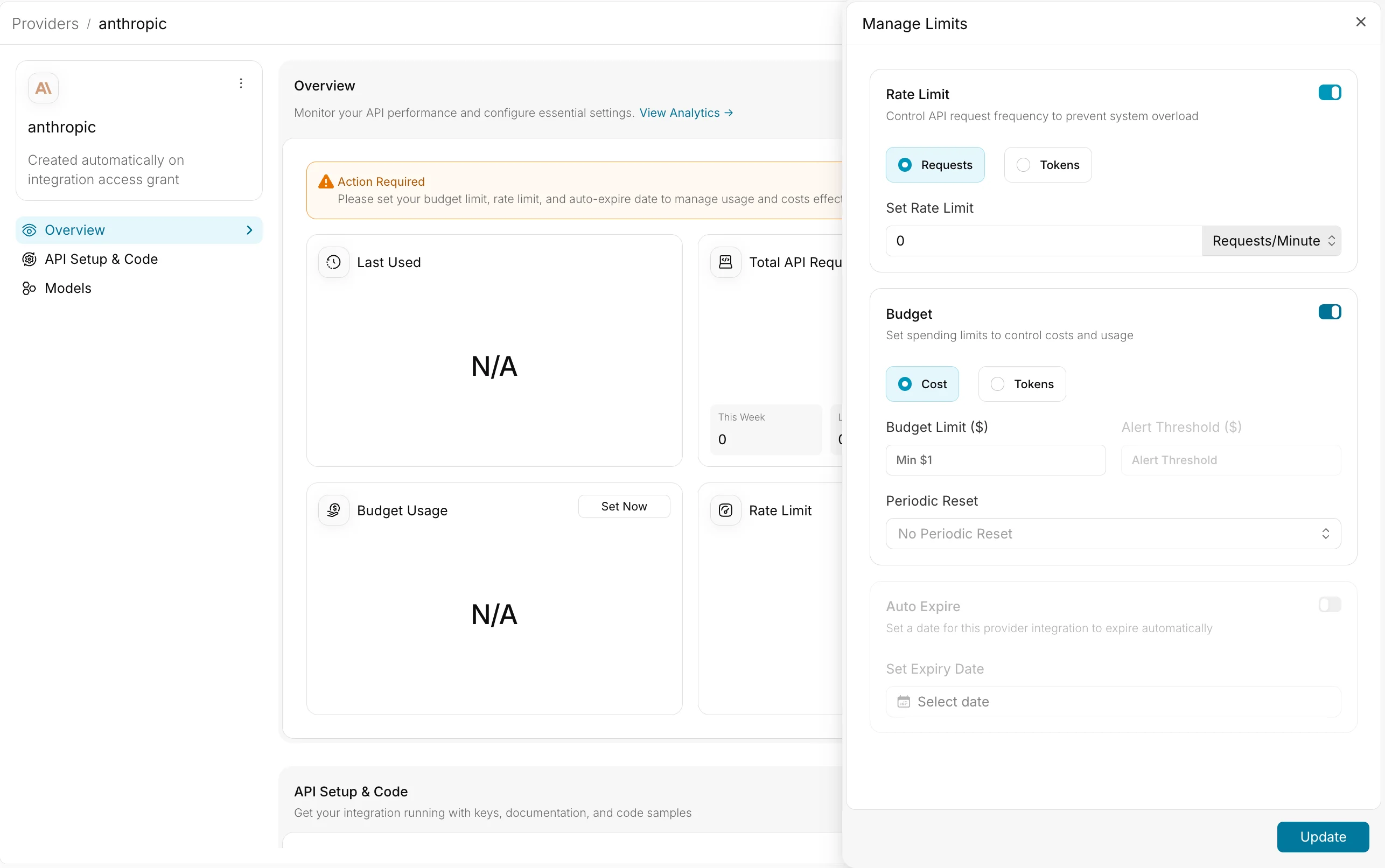
Level 4 — Usage Limit Policies
Policies are rules you define once and apply dynamically to a filtered slice of traffic — without touching individual workspaces or keys. You define two things: conditions (which requests does this policy match?) and group by (does every matching request share one counter, or does each unique value get its own?). Supports: Budget, Token, Request count Resets: Weekly, monthly, every N days, or neverUse Cases
Per-user spend cap without managing individual keys Tag every request with a user identifier in metadata. A single policy gives each user their own independent monthly budget. No key rotation when users join or leave. Per-customer quotas in a multi-tenant product Each customer’s usage is tracked and capped independently. One customer hitting their limit doesn’t affect anyone else. Cap spend on a specific model Set a separate monthly budget scoped to one expensive model. Even if overall spend is within other limits, that model’s cost is controlled separately. Enforce free-tier limits Tag requests by plan type. Free-tier users share no counter with paid users, and their request limit resets monthly automatically. Isolate spend by provider All traffic to a particular provider shares a single monthly budget across all users — regardless of which workspace or key generated the request. Limit a specific prompt template Each user gets their own daily token budget when calling a specific prompt. Other prompts are unaffected. Target production traffic only A policy scoped to a production environment flag leaves development and staging traffic completely untouched.Level 5 — Rate Limit Policies
Same as usage limit policies, but for rate limiting. Conditions and group-by work identically — the difference is that these enforce a requests-per-minute (or hour/day/week) ceiling rather than a cumulative budget. Supports: Rate limits (per minute / hour / day / week) on requests or tokensUse Cases
Per-user rate limiting without individual keys Each user gets their own rate limit from a single policy. No need to issue or manage a separate key per user. Protect an expensive model from traffic spikes A model-scoped policy caps total throughput across all users. No single spike can flood it. Throttle bulk operations separately Embedding or batch-style endpoints are often called in high volumes. Rate limit them independently so they don’t crowd out other traffic. Different rate limits per subscription tier Starter customers get 5 requests per minute; growth customers get 20. Two policies, defined once — updating a customer’s tier just means changing a metadata value. Org-wide provider throughput cap All traffic to a provider shares a single rate limit window, mirroring any throughput agreement you have with them.What Happens When a Limit Is Hit
| Situation | Response | Notes |
|---|---|---|
| Budget, token, or request cap reached | 412 | Blocked immediately. No spend is incurred. Clears after reset or manual action. |
| Rate limit exceeded | 429 | Blocked temporarily. Clears automatically as the time window rolls forward. |
| API key past its expiry date | 401 | Blocked until the key is renewed or replaced. |
Combining Levels
Hard ceiling with per-team sub-limits Set a budget on the integration as an absolute ceiling, then give each workspace a smaller allocation. Teams manage their own spend; the integration limit is the safety net. Organisation-wide cap with per-user rate limits A policy caps total throughput for the whole organisation. A second policy gives each user their own smaller window. Both apply simultaneously. Lifetime budget for an automated workflow An API key with a fixed budget and no reset runs until the budget is gone, then stops. Pair with an alert threshold to know when it’s running low. Free-tier metering at scale Tag every request with user and plan metadata. A single policy enforces per-user monthly limits for free-tier users. Moving a user to a paid plan just means updating their metadata.Next Steps
API Keys
Create and manage API keys with budget and rate controls
Workspaces
Configure workspace-level budgets and access controls
Usage Limit Policies
Set up dynamic limit policies with conditions and group-by
Tracking Costs with Metadata
Attach metadata to requests for per-user and per-feature cost visibility