

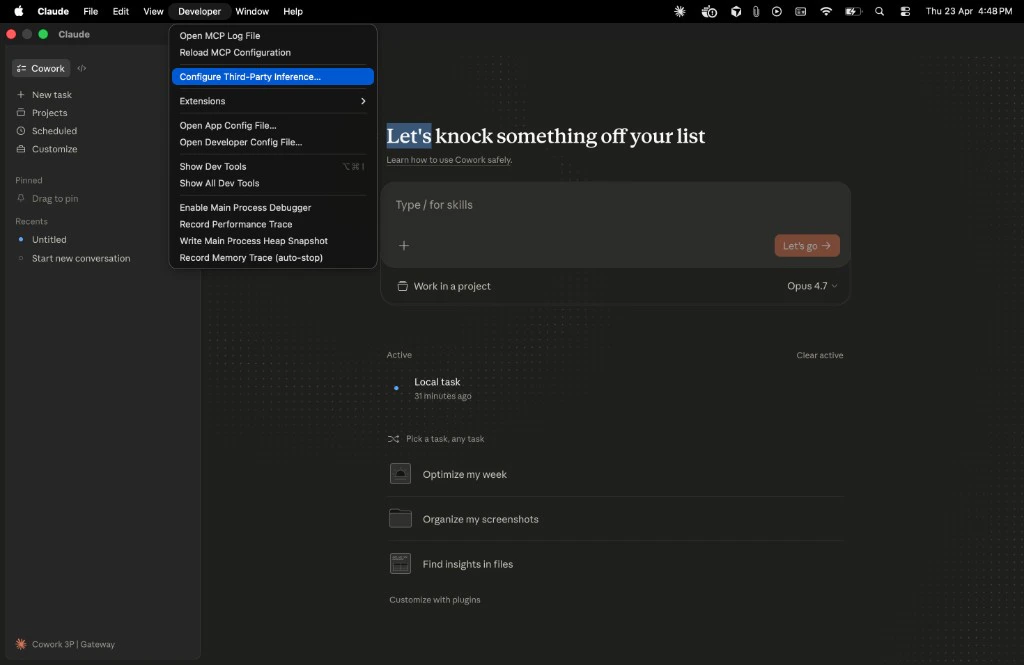
Requirements: Claude Desktop with third-party inference support (any recent build from late 2025 onward). If you don’t see Configure third-party inference under the Developer menu after enabling Developer mode, update the app from claude.ai/download.
What you need before starting
Get these three values from your platform admin. If you’re a solo builder, follow the Platform Admin Guide first to create them yourself.Gateway URL
https://api.portkey.ai for Portkey SaaS, or your custom URL if your org self-hosts. Confirm with your admin.Portkey API Key
A scoped key from API Keys
Metadata Template
JSON for the
x-portkey-metadata headerConnect Claude Desktop to Portkey
Enable Developer mode
Open Help → Troubleshooting → Enable Developer mode. The menu lives in the menu bar on macOS and the hamburger menu (top-left) on Windows.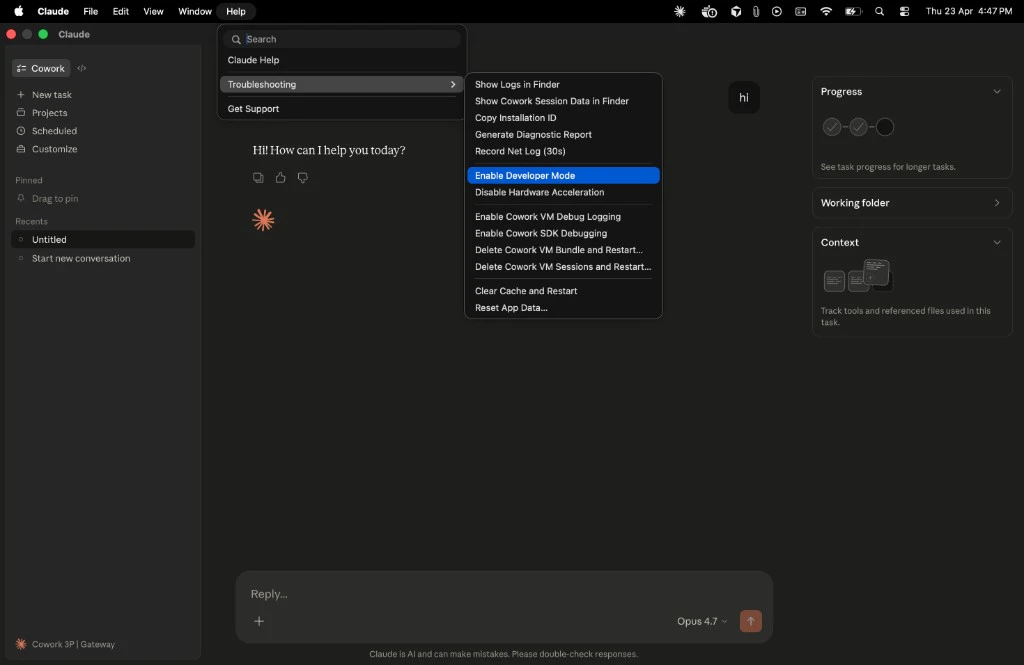
Set the Gateway connection
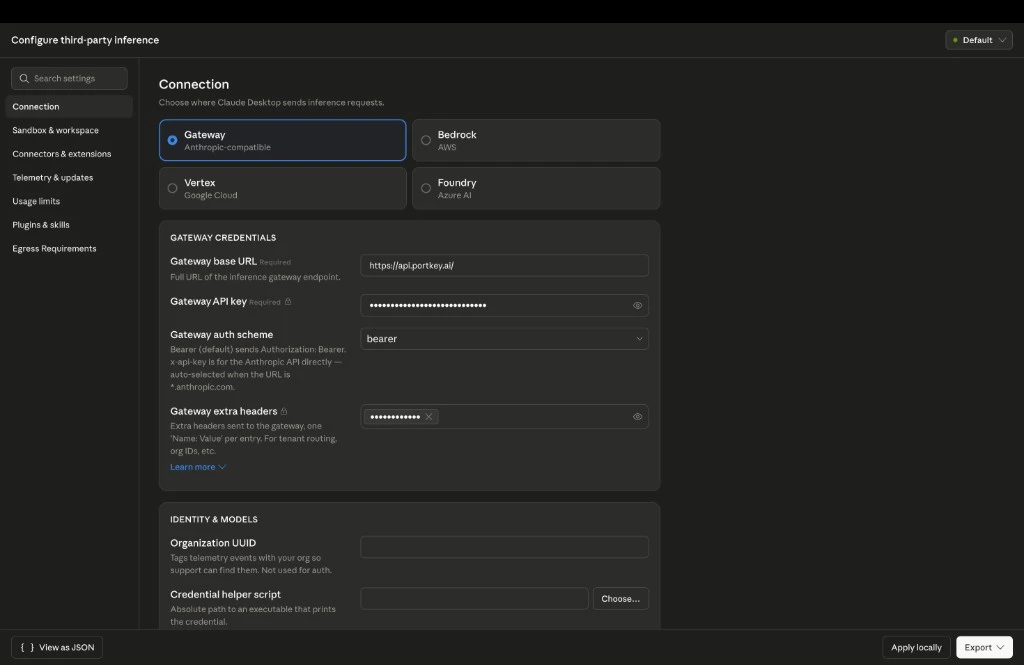
Select Gateway (Anthropic-compatible) and fill in the fields:
| Field | Value |
|---|---|
| Gateway base URL | https://api.portkey.ai |
| Gateway API key | Your Portkey API key |
| Gateway auth scheme | bearer |
Add the metadata header
Under Gateway extra headers, add a new header:

| Field | Value |
|---|---|
| Header name | x-portkey-metadata |
| Header value | (your metadata JSON) |
Replace the values with what your platform team specifies. These fields drive analytics attribution and per-team filtering in Portkey.
Verify it works
Send any prompt in Claude Desktop, then run through these two checks.Confirm the request reached Portkey
Open Portkey Logs. Your request should appear within a few seconds, tagged with the metadata you set in step 4.

Request shows in Logs with correct metadata and the expected model? You’re done.
Troubleshooting
Why am I getting a 401 or 403 error?
Why am I getting a 401 or 403 error?
Your Portkey API key is expired, revoked, or scoped to a different workspace. Get a fresh key from your admin or generate one yourself at API Keys.
Why aren't my requests appearing in Logs?
Why aren't my requests appearing in Logs?
Three things to check:
- Base URL is correct:
https://api.portkey.aifor Portkey SaaS, or your org’s self-hosted gateway URL. No trailing slash, no/v1. - Auth scheme is set to
bearer. - You fully quit and relaunched Claude Desktop after applying settings (not just closed the window).
Why isn't my policy applying?
Why isn't my policy applying?
Metadata JSON must be valid (no trailing commas, no single quotes). Key names are case-sensitive and must exactly match what your admin configured in the policy rules.
Why is the wrong model responding?
Why is the wrong model responding?
Model routing is controlled by your admin’s config in Portkey. If you’re getting unexpected model behavior, your team’s config likely points to a different model than you expect. Check with your platform team.
Why doesn't Configure third-party inference appear in my menu?
Why doesn't Configure third-party inference appear in my menu?
FAQ
Does this work on both macOS and Windows?
Does this work on both macOS and Windows?
Yes. The menu paths differ slightly (covered in Step 1) but the gateway settings and headers are identical.
Can I still use Claude Cowork while routed through Portkey?
Can I still use Claude Cowork while routed through Portkey?
Yes, but Cowork has its own configuration surface inside Claude Desktop. See the Claude Cowork guide for the Cowork-specific setup.
Will routing through Portkey slow down responses?
Will routing through Portkey slow down responses?
Portkey adds single-digit milliseconds of overhead per request. You won’t notice it during normal use.
What happens if Portkey is unreachable?
What happens if Portkey is unreachable?
Claude Desktop will surface the connection error like any other API failure. If your admin configured fallbacks in the Portkey config, traffic automatically routes to a backup provider before that happens.
Can I use this with a personal Claude account?
Can I use this with a personal Claude account?
Yes. Third-party inference is a Claude Desktop setting independent of your account type. Your platform admin can issue you a personal-scoped API key for pilot or solo use.
Does Claude Desktop store my Portkey API key securely?
Does Claude Desktop store my Portkey API key securely?
Claude Desktop stores third-party inference credentials in the OS keychain (macOS Keychain or Windows Credential Manager).
My org runs Portkey on-prem. What URL do I use?
My org runs Portkey on-prem. What URL do I use?
Your admin will give you the gateway URL for your self-hosted deployment. It will not be
api.portkey.ai. Everything else in this guide stays the same: same auth scheme, same metadata header, same setup flow.Next steps
Add metadata to your traces
Tag requests with custom keys for richer filtering and cost attribution.
Group requests by session
Use trace IDs to group related prompts into a single session view.
Understand your spend
Filter analytics by team, model, or environment.
Set up alerts
Get notified before you hit budget caps.